
Dynamic QR Codes: The Complete Business Guide (2026)
Most QR codes are static — and static means stuck. Here is what dynamic QR codes do differently, where to place them for maximum scans, and what the data says about the industries using them most effectively.
Why Most QR Codes Are Set Up Wrong Before They Are Even Printed
QR codes had a slow decade and then a very fast pandemic. In the three years after 2020, global QR code usage grew by roughly 750%, driven by contactless menus, payment flows, and the sudden realisation that printing a URL as a graphic was more useful than anyone had given it credit for. By 2024, an estimated 6.8 billion QR code scans were logged in the United States alone. The technology is not going anywhere.
And yet the majority of QR codes in active use today are set up in a way that makes them almost impossible to learn from — and frequently expensive to fix when they are wrong. The reason is a decision made at the start: static versus dynamic.
This guide covers what that distinction means in practice, how to use dynamic QR codes effectively across different industries, and what the data shows about where QR code campaigns succeed and fail.
Static vs Dynamic: What the Difference Actually Is
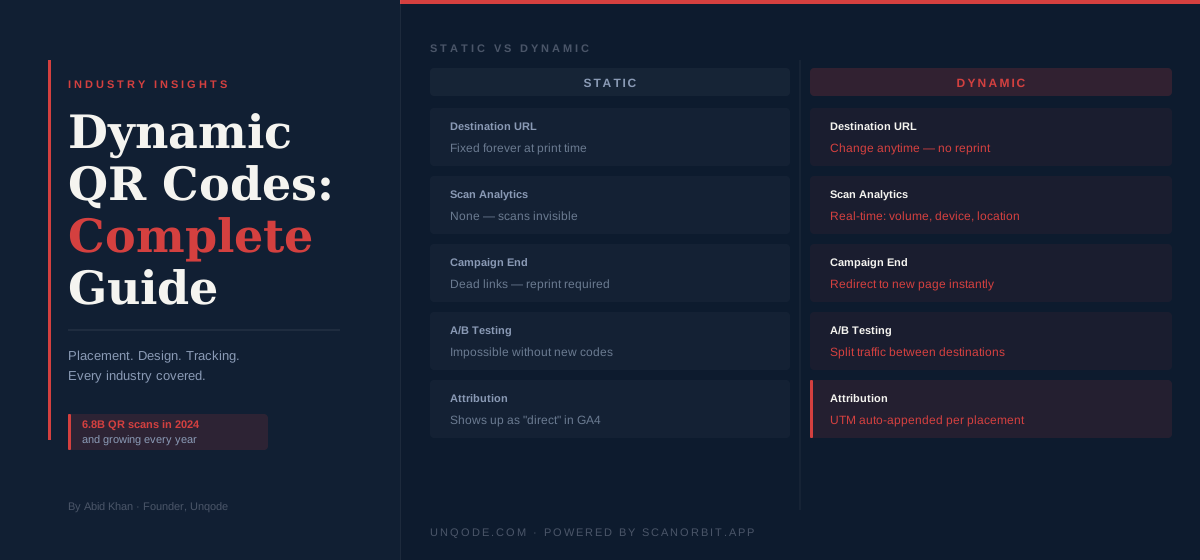
A static QR code encodes a destination — typically a URL — directly into the pattern of black and white squares that make up the code. When someone scans it, their phone reads the pattern and opens whatever it encoded. The URL is permanent. You cannot change it. You cannot track who scanned it, when, or from where. Once the code is printed, the decision is final.
A dynamic QR code works differently. The pattern in the code does not point directly to your final destination — it points to a short redirect URL managed by the QR code platform. When someone scans it, the platform logs the scan and then sends the user to wherever you have set the redirect to go. This means two things: you can change the destination anytime without reprinting the code, and you can see scan data in real time.
The difference between static and dynamic is not a feature. It is a category. One is a printed graphic with a fixed address. The other is a managed channel you control and can measure.
For a business printing QR codes on physical materials — menus, packaging, signage, business cards, product labels — the implications are significant. Static codes mean committing to a URL at print time. If the URL changes, the code is dead. If the page at that URL disappears or moves, every printed code becomes a broken link. Dynamic codes eliminate both problems entirely.
What Dynamic QR Codes Enable That Static Cannot
Update the destination without reprinting
The most immediately practical advantage. A restaurant that prints table QR codes for its menu can update the menu without ordering new codes. A product package with a QR code linking to a promotion can redirect to a different promotion when the first one ends. A business card printed in 2024 can point to a current, relevant landing page in 2026. The physical code remains identical; the destination changes in seconds from a dashboard.
See who scanned, when, and from where
Dynamic QR codes provide scan-level analytics: total scans over time, unique vs repeat scans, the devices used, the operating systems, and the geographic location of scans down to city level. For any business running campaigns across multiple placements — a poster, an email footer, a product label, and a print ad — this data tells you which placements are actually driving traffic and which ones are not earning their budget.
A/B test destinations
Some dynamic QR code platforms allow you to set multiple destinations and split traffic between them. This is the same principle as a landing page A/B test, applied to physical media. You print one code, point half the traffic to one page and half to another, and see which converts better. For retail packaging, event materials, or direct mail campaigns, this is meaningful optimisation capability that does not require reprinting anything.
Set time-based or scan-limit redirects
A campaign code that redirects to a limited-time offer can automatically redirect to a standard page once the offer expires, without anyone needing to manually update it. A code printed on a flyer for an event can redirect to the event page before the event and to a recording or recap after. These automations require no design work — they are scheduling rules applied to a redirect.
Password protection and gating
Dynamic codes can require a password before the redirect resolves — useful for employee-only resources, member-exclusive content, or private documents distributed in physical form. The code can be printed and distributed openly; only people with the password can access what it leads to.
QR Code Placement: What Actually Gets Scanned
Placement is the single biggest variable in QR code scan rate, and it is the variable most often determined by design convenience rather than user behaviour. Here is what the data and consistent field observation show about what drives scans.
Context and proximity to intent
QR codes get scanned when the person scanning has a clear reason to do so at exactly that moment. A QR code on a restaurant table gets scanned because the person is sitting down and hungry and wants to see the menu — their intent is immediate. A QR code on a billboard alongside a motorway does not get scanned because the person is moving at speed and has no safe or convenient way to act on the prompt.
The principle: place the code at the moment of highest intent, not at the moment of highest visibility. A code inside a package performs better than one on the outside — the person opening the package is engaged, curious, and has already made the purchase decision. A code on a receipt at the bottom of a bag gets scanned far less often than one handed over personally with a verbal prompt.
Size and scan distance
QR codes need to be large enough to scan from the distance at which a user is likely to hold their phone. The minimum recommended size for a code intended to be scanned at arm's length (roughly 30cm) is 2.5cm × 2.5cm. For codes intended to be scanned from further away — a poster, a window display, a screen — scale accordingly: a code scanned from one metre should be at least 10cm × 10cm. Codes printed too small are a common cause of low scan rates in campaigns where the creative prioritises aesthetics over function.
Clear call to action above or below the code
The scan rate on QR codes accompanied by a descriptive call to action is consistently higher than on codes printed alone. "Scan to see the full menu" outperforms a bare QR code. "Scan for 15% off your next order" outperforms "scan here." The code itself communicates nothing about what the user will get by scanning it — the text around it does that job, and it matters.
Contrast and error correction
A QR code must have sufficient contrast between its dark modules and its light background to scan reliably. The minimum recommended contrast ratio is 4:1. Codes printed in dark ink on dark backgrounds, or with brand colours applied in a way that reduces contrast, fail silently — they look fine but will not scan on many devices in poor lighting. Logos placed inside QR codes are supported up to a certain size (roughly 30% of the code area) because the QR standard includes built-in error correction, but beyond that threshold, scan reliability drops.
QR Codes by Industry: Where They Work and Why
Restaurants and hospitality
The hospitality sector led QR code adoption during the pandemic and has retained it. Digital menus eliminate print costs, allow real-time updates for 86ed items and specials, and make it trivial to maintain separate menus for dine-in, takeaway, and delivery. The higher-value use is post-meal: a QR code on the receipt or a table card prompting a review on Google Maps, with a discount for a return visit. This one touchpoint, handled well, is one of the highest-ROI uses of QR codes in any sector.
Retail and product packaging
Product labels have limited space. A QR code on packaging can point to anything that would not fit on the label itself: full ingredient information, provenance documentation, video demonstrations, setup instructions, care guides, or loyalty programme enrolment. For brands that sell through retail channels where they have no control over the point of sale, the product itself becomes a direct communication channel — and the QR code is the bridge.
Events and conferences
Dynamic QR codes on event badges replace printed business cards with a living contact. Scan the code on someone's badge and get their current LinkedIn, website, or contact form — not a card that will be lost and outdated within a year. For event organisers, QR codes on session materials, sponsor stands, and venue signage allow foot traffic measurement at a granularity that was previously only available through dedicated tracking infrastructure.
Healthcare
Patient intake forms, medication information, aftercare instructions, and appointment booking flows are all natural targets for QR codes in clinical settings. The key constraint in healthcare is privacy: any QR code that leads to a page containing or collecting personal health information needs to go through a secure, compliant landing page, not a generic short URL. Dynamic QR code platforms that offer HTTPS redirects and do not log personally identifiable scan data are the appropriate choice here.
Real estate
For-sale and for-rent signage has carried QR codes for over a decade, but most of that implementation has been static codes pointing to a listing page that goes dead when the property sells. Dynamic codes for property signage allow the destination to be updated to "sold," to a different active listing from the same agent, or to a contact form — without touching the sign. For estate agents managing large portfolios of physical signage, this alone is worth the switch.
Print advertising and direct mail
Print has a measurement problem: historically, there was no reliable way to know whether a print ad drove any traffic. A unique dynamic QR code per placement solves this entirely. A campaign running across a trade magazine, a local newspaper, and a direct mail piece can have three distinct codes, all pointing to the same landing page, with scan data broken out by source. This is not a new idea, but it is still underused — most print QR code implementations still use static codes, making the measurement impossible.
What to Track and How to Use the Data
Dynamic QR code analytics are only useful if you act on them. Here is what to look at and what the data typically reveals.
Scan volume over time
The daily scan chart tells you when people engage with your code, which tells you about context. A restaurant QR code with scan peaks at lunchtime and dinner time is confirming expected usage. The same code with a peak at 10am suggests people are looking at the menu before they arrive — which is useful context for thinking about reservations or pre-ordering. Anomalies in the time-series (sudden drops, spikes on specific days) are signals worth investigating.
Device breakdown
If 70% of your QR code scans are coming from Android devices and your landing page experience has not been tested thoroughly on Android, that is a performance gap. Device data from QR analytics often reveals mismatches between the audience assumption built into the destination page and the audience actually arriving.
Geographic distribution
For businesses with codes across multiple physical locations, geographic scan data shows which locations drive the most engagement. For single-location businesses distributing print materials across a wider area (a flyer campaign, for example), geographic data shows where the materials are being encountered and acted upon.
Repeat vs unique scans
High repeat scan rates on a restaurant menu code are normal and unremarkable. High repeat scan rates on a promotional code that was supposed to drive one-time conversions suggests the page is not converting on the first visit — worth investigating whether the landing page is doing its job.
Common Mistakes That Kill QR Code Campaigns
Sending to a desktop-optimised page. QR codes are scanned on phones. If the page the code resolves to is not mobile-optimised, you have broken the experience at the last step. Check the destination on multiple phone sizes before printing anything.
No call to action on the code itself. A bare QR code communicates nothing about what scanning it will do. A code with three words ("Scan for menu," "Scan to apply," "Scan for 10% off") converts at a meaningfully higher rate.
Using static codes for campaigns with a defined end date. Every campaign QR code should be dynamic. The campaign will end. The destination will change. A static code printed at scale becomes dead links at scale.
Printing codes too small. Test scan reliability before print runs. Print a proof, hold it at the expected scan distance, and attempt to scan it on three different phones. If any fail, the code is too small or the contrast is insufficient.
No UTM parameters on the destination URL. A dynamic QR code redirect can append UTM parameters to the destination URL, feeding source, medium, and campaign data into your analytics platform automatically. Without this, QR code traffic shows up in Google Analytics as "direct" traffic, making it invisible as a channel in your attribution.
Treating the scan as the end of the journey. The scan is the beginning. What happens on the landing page determines whether the QR code campaign delivers value. Scan rate is an engagement metric. Conversion rate on the destination page is the business metric. Optimise both.
Getting Started
The practical starting point for most businesses is a free dynamic QR code platform that offers analytics, unlimited updates, and custom redirect management without requiring a design or development team to operate.
ScanOrbit does exactly this. You create a dynamic code, set the destination, and get a real-time analytics dashboard showing scan volume, device breakdown, and geographic data. If the destination changes — menu updated, promotion ended, page moved — you update the redirect in the dashboard without touching the code. The code that was printed last month, or last year, still works.
For businesses that have been using static QR codes and want to transition: there is no shortcut on printed materials already in circulation. Those codes cannot be converted. The right time to switch is the next print run. For anything that has not been printed yet, use a dynamic code. The setup time difference between static and dynamic is measured in seconds; the operational flexibility difference is permanent.
If you are thinking about QR code placement, design, or campaign strategy as part of a broader digital marketing effort, our team at Unqode works with businesses on exactly this — connecting physical and digital touchpoints into campaigns that are measurable end to end. You can start that conversation here.
ScanOrbit
Create dynamic QR codes with real-time analytics, unlimited updates, and custom branding — free to start.
Written by
Founder & CEO
Founder of Unqode. Fifteen years designing B2B SaaS, healthcare, and fintech products for teams across India, the UK, and North America.
View all articles

Want us to audit your product?
Book a free 30-minute call and we will tell you exactly what to fix first.
Book a free call