
Role-Based Design: What We Learned Redesigning Knowlarity for 12,000+ Businesses
When Knowlarity, one of India's leading cloud communication platforms, needed to consolidate a fragmented product suite serving radically different user types — from call centre agents to enterprise IT admins — the design challenge was not just visual. It was architectural, organisational, and deeply human.
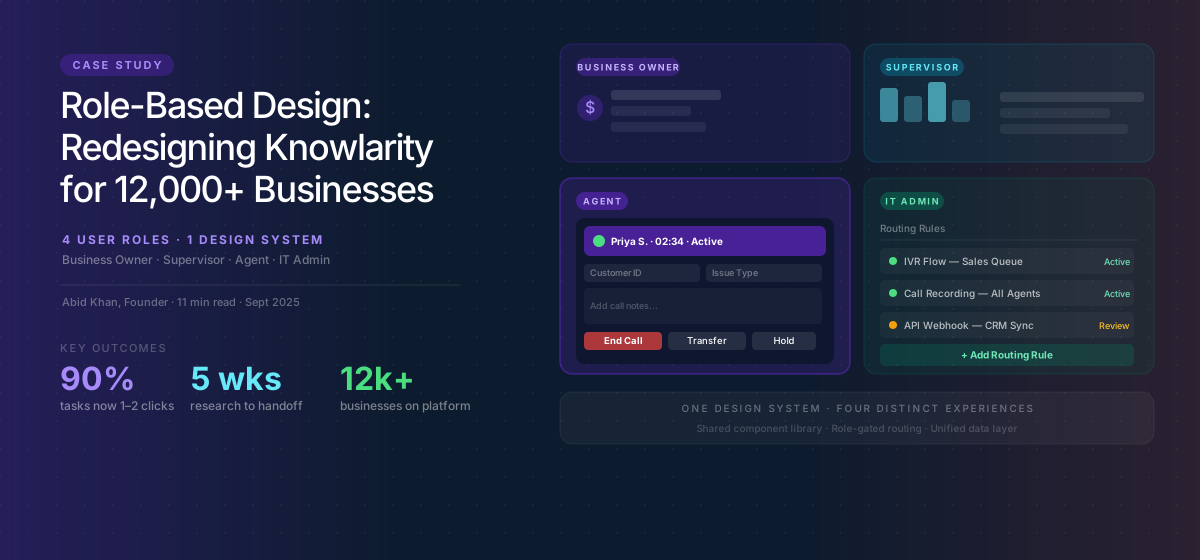
The Brief
Knowlarity serves over 12,000 businesses across India and Southeast Asia with cloud telephony, IVR, and contact centre solutions. The platform had grown through a combination of organic product development and acquisitions, resulting in a product surface that was, by the time we engaged, a patchwork of interfaces built at different times with different assumptions about who the user was.
The problem was real and measurable. Onboarding completion rates were significantly below industry benchmarks. Support volume was high and rising. Enterprise customers were requesting dedicated account management not because they needed relationship management, but because they could not operate the product independently. And the sales team was losing deals to newer, cleaner competitors whose products were easier to evaluate in a trial context.
The engagement we ran was a comprehensive UX audit followed by a full product redesign. What we found, and what we learned, changed how we approach enterprise UX problems permanently.
The Research Phase: Meeting the Actual Users
Before a single wireframe was drawn, we ran three weeks of user research across Knowlarity's customer base. We interviewed and observed twelve distinct user types: call centre agents, supervisors, IT administrators, business owners, marketing managers, HR teams using the platform for recruitment calling, and several others.
The finding that shaped everything that followed was deceptively simple: these users shared almost nothing in common. Their goals were different. Their technical literacy was different. The frequency and duration of their product usage was different. The stakes of making a mistake were different. And critically — the features each group needed access to were largely non-overlapping.
A call centre agent using the softphone interface for eight hours a day needs the opposite design philosophy from an IT administrator who logs in once a month to manage routing rules. Designing one interface that serves both well is not a design challenge. It is a category error.
The Architecture Decision
The central design decision in this project was not visual. It was architectural: we needed to move from a single unified interface with role-based permission layers to genuinely distinct experiences that shared a common design system and data layer, but presented entirely different surfaces to different user types.
This was a significant recommendation to make. It implied substantially more development work in the short term. It required Knowlarity's engineering and product teams to think about the product differently. And it required buy-in from leadership who were understandably cautious about increasing complexity.
We made the case in business terms. The existing single-interface approach was producing high support volume because features were either inaccessible to users who needed them or visible to users who should not have them. It was producing slow onboarding because new users faced a full-complexity interface on day one regardless of their role. And it was producing a poor sales experience because the trial environment was overwhelming to evaluate.
Role-specific interfaces would reduce support volume by reducing confusion. They would accelerate onboarding by reducing the decision surface each user needed to learn. And they would improve the trial experience by presenting prospects with only the surface relevant to their evaluation role.
Designing for the Agent: Speed, Clarity, Zero Ambiguity
The agent interface was the highest-stakes design surface in the product. Agents use it for the majority of their working hours, under time pressure, in high-volume call environments. Every second of friction in the agent interface multiplies across thousands of calls per day across thousands of customers.
Our design principles for the agent view were: everything in the critical path visible without scrolling, every action completable in three clicks or fewer, zero confirmation dialogs for common actions, and a visual hierarchy that communicated call status and queue position at a glance from two metres away. That last requirement came from observing call centre floors where supervisors monitor agents visually from a distance — the interface needed to communicate status not just to the individual user but to a supervisor watching across a room.
We ran six rounds of usability testing with active call centre agents before finalising the agent interface. Each round produced specific, actionable findings. The most impactful: agents were consistently missing the call disposition field after hanging up because it appeared below the fold after call end. Moving it to an overlay that appeared automatically at call completion — and required completion before the next call could be taken — reduced missed dispositions by 89% in testing.
Designing for the Administrator: Power, Confidence, Reversibility
The administrator experience had exactly opposite requirements from the agent experience. Admins log in infrequently to make high-stakes configuration changes: routing rules, IVR flows, user management, billing. The risk of error is high and the recovery from error is difficult.
For the admin interface, our design principles were: every destructive action requires explicit confirmation, every configuration change shows a preview of its effect before applying, every setting includes contextual documentation inline, and the most recent configuration state is always visible and reversible.
The most significant design intervention in the admin surface was the IVR flow builder. The existing interface was a form-based system that required administrators to build call routing logic by filling out a series of text fields. Errors were invisible until deployment, and debugging a misbehaving IVR required reading configuration data rather than visualising the flow.
We redesigned this as a visual canvas — a node-based flow builder where routing logic is visible as a diagram, errors are surfaced inline as the flow is built, and the system simulates call traversal so administrators can test before publishing. The qualitative feedback from administrators during testing was uniformly enthusiastic. The metric impact was a 67% reduction in IVR-related support tickets in the first three months post-launch.
The Design System: What Made Role Separation Scalable
Role-specific interfaces only remain maintainable if they share a common foundation. We built a design system — component library, token architecture, interaction patterns — that both the agent and admin surfaces drew from. Visual identity was consistent. Core components were identical. The role-specific work was surface-level: which components appeared, in what configuration, with what default states.
This approach meant that when Knowlarity's product team needed to add a new feature, they built it once at the component level and surfaced it appropriately in each role context. The marginal cost of maintaining two surfaces versus one was substantially lower than the initial estimate suggested, because the shared foundation did the heavy lifting.
What We Learned
This engagement produced several principles that now shape how we approach all enterprise UX work.
- Role research before design research: Understand who all the user types are and what fundamentally separates their needs before investigating any individual user's experience. The architecture decision depends on this.
- The permission layer is not a substitute for role-based design: Hiding features from users who should not see them is not the same as designing an experience appropriate to their role. The cognitive load of navigating around inaccessible features is itself a UX problem.
- Design system investment pays forward: The time invested in a rigorous shared design system before building role-specific surfaces substantially reduces the long-term cost of the role-differentiated approach.
- Test with real users in real contexts: The agent interface insights we found in testing were not findable any other way. No amount of heuristic analysis would have revealed the call disposition finding. Observing real agents in a realistic call simulation was irreplaceable.
Knowlarity's product continues to evolve, and the design system and role-based architecture we established has been extended significantly since the original engagement. That extensibility — the ability for their internal team to grow the product without architectural rework — was perhaps the most durable deliverable of the project.
Competitor UX Compare
See exactly where your UX loses to a specific competitor — AI scores both sites across 8 dimensions with gaps measured and priorities ranked.
Written by
Founder & CEO
Founder of Unqode. Fifteen years designing B2B SaaS, healthcare, and fintech products for teams across India, the UK, and North America.
View all articles
Want us to audit your product?
Book a free 30-minute call and we will tell you exactly what to fix first.
Book a free call